Choose your goal

What do you want to do in PoE 2?

Choose the result you want, see how the setup works and find the Findigo edition that supports it.

26 ways to playParty control · loot · radar · performance
01The flagship setup

Four characters. One controller.

Run four independent Path of Exile 2 characters across two official clients on one Windows PC with Findigo Ultimate.

Explore the setup →
02The simplest co-op setup

One PC. One controller. Two characters.

Control two Path of Exile 2 couch co-op characters with one controller using Findigo Standard or Ultimate.

Explore the setup →
03A party size you don’t usually see

Three characters. One physical controller.

Run three Path of Exile 2 characters across two clients on one PC with Findigo Ultimate’s three-player mode.

Explore the setup →
04Loot without breaking flow

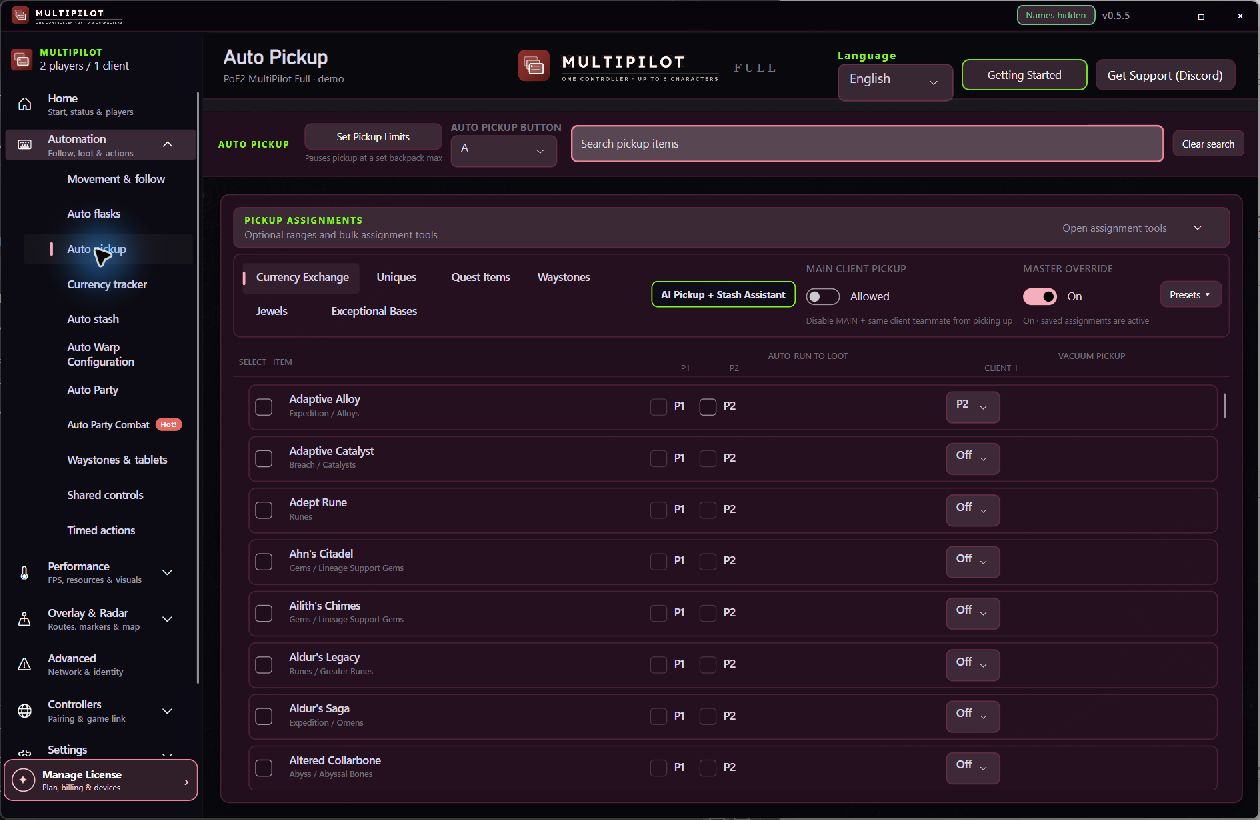
See it. Assign it. Pick it up.

Configure Path of Exile 2 controller AutoLoot with searchable item choices and per-player pickup assignments in Findigo.

Explore the setup →
05A second character with a job

You fight. They collect.

Use a second, third or fourth Path of Exile 2 character to collect assigned drops while your main character keeps fighting.

Explore the setup →
06One campaign run, four characters

One carry. Three alts. One controller.

Configure one geared Path of Exile 2 carry and three following alts for a single four-character campaign run with Findigo Ultimate.

Explore the setup →
07Stop searching the entire map

The next objective gets a line.

Use Findigo’s Path of Exile 2 radar and terrain-aware route guidance to reach map bosses, Ritual, Breach and Expedition objectives faster.

Explore the setup →
08See more. Run smoother.

A wider view. More room to breathe.

Compare Path of Exile 2 camera zoom and FPS Enhanced settings in Findigo Ultimate, with clear controls and restoration behaviour.

Explore the setup →
09A different two-character setup

Two clients. Two characters. One controller.

Run P1 and P2 in two separate official Path of Exile 2 clients on one Windows PC with one physical controller and Findigo Ultimate.

Explore the setup →
10Keep the party together

Move one character. Bring the party.

Keep extra Path of Exile 2 characters in formation with configurable Smart Follow routes, stopping distances and controller focus.

Explore the setup →
11Finish the map loop faster

Map done. Stashed. Next map.

Move supported Path of Exile 2 items into configured stash tabs, preserve minimum quantities and resume collection below your limits.

Explore the setup →
12Prepare the next run

Craft the map. Keep the guardrails.

Use guarded Findigo crafting controls to prepare supported Path of Exile 2 mapping items from a controller-focused workflow.

Explore the setup →
13Co-op party, solo player

Couch co-op without a second person.

Use one controller to play both Path of Exile 2 couch co-op characters yourself with Findigo Standard.

Explore the setup →
14Give every drop an owner

P1. P2. Both. Or leave it.

Assign Path of Exile 2 loot rules to P1, P2, both characters or off, and use extra party members for collection.

Explore the setup →
15Choose the right setup

One controller. Four ways to build a party.

Choose a Path of Exile 2 controller setup for one, two, three or four characters on one Windows PC with Findigo.

Explore the setup →
16Two characters, one campaign

Level both characters in the same run.

Progress two independent Path of Exile 2 characters together in local couch co-op using one controller and Findigo Standard.

Explore the setup →
17Give P2 a different job

One main. One support. One controller.

Pair a main Path of Exile 2 build with a separate support character using Smart Follow and Smart Focus from one controller.

Explore the setup →
18One PC, several party layouts

Multiple PoE 2 characters. One Windows PC.

Compare one-client couch co-op and two-client Findigo setups for running two, three or four Path of Exile 2 characters on one Windows PC.

Explore the setup →
19Two official clients, one desktop

Build the dual-client setup in a clear order.

Understand Findigo Ultimate’s supported two-client Path of Exile 2 combinations, player assignments and guided pairing order.

Explore the setup →
20Find the boss sooner

Map boss found. Route drawn.

Use Findigo radar to identify a Path of Exile 2 map boss target and follow terrain-aware guidance through the discovered map.

Explore the setup →
21Find the content you came to run

Ritual. Breach. Expedition. Pick the target.

Route toward supported Path of Exile 2 league content such as Ritual, Breach and Expedition with Findigo’s configurable radar.

Explore the setup →
22Do not leave Tribute behind

Map complete. Tribute still waiting.

Get a completion-aware Ritual Tribute reminder after the Path of Exile 2 map objective is complete when Ritual was present.

Explore the setup →
23Recovery rules for each player

Flasks when needed. Quiet when unsafe.

Configure life and mana flask recovery rules per player with menu guards, thresholds and safety controls in Findigo.

Explore the setup →
24Keep the route through transitions

The party follows through the doorway.

Keep supported Findigo followers moving through stairs, portals and zone exits with explicit transition handling.

Explore the setup →
25Recover the gap

Fall behind. Sprint back into formation.

Help distant Path of Exile 2 followers rejoin their leader with configurable sprint catch-up and breadcrumb routing.

Explore the setup →
26Share only the controls you choose

Route the action. Keep control of the party.

Configure selective shared inputs, Auto Cast and timed controller actions for supported Findigo party characters.

Explore the setup →
Continue on Windows

Send Findigo to your PC

Email the Windows link to yourself or copy it and open it on your PC. No account is created.

This email is used only to send the download link you request.
or
I am already on my Windows PC - download directly