
The party stashes together
Every character walks to the stash and stashes at the same time, and the stash closes again after each visit so the campaign carries on.

Last Epoch · Season 5 · 1–4 clients on one PC
Press Start and up to four characters play through Last Epoch’s campaign together, levelling the builds you picked. Then take the party into the Monolith — or take the controls yourself whenever you like.
Smart Focus — switch characters without leaving your seat.
Watch it
See MultiPilot run a four-character Last Epoch party from one PC — follow, combat, loot and switching in two minutes.
New in 1.0.51
MultiPilot 1.0 plays the story, levels your builds, runs the Monolith and tidies the stash — while you decide how much to play yourself. 1.0.51 has the whole party stash at once, gets stuck quest steps going again by itself, plans each zone so nobody walks back, and makes levelling guides and auto-equip smarter. Existing players get it as a free in-app update.
Every character walks to the stash and stashes at the same time, and the stash closes again after each visit so the campaign carries on.
If arriving in a zone doesn’t count, the party goes back and comes in again like a player would, and a broken bridge no longer strands it.
Nemesis eggs, Omen Windows, Blood Crystals and shrines are planned when the party arrives in a zone and picked up along the way.
When something needs you, the in-game status line says what to do, and Resume tells you if it is still needed.
Pick each character’s mastery under Build › Mastery and the campaign takes it at the right point in the story, even without a build.
New skills take over at the levelling guide’s levels, the skill bar follows each phase, and extra points are spent from the guide’s later trees.
Upgrades go on between packs. It favours uniques, corrupted items, higher tiers and weapon damage, and leaves alone an item you took off yourself.
P1 pushes ahead to the big packs while P2–P4 clean up the small ones, and the last seconds go to the best packs. RUN IT or SKIP right in the game.
A client won’t launch while it is signed in to the same Steam account as another client, and the app tells you which one.
The troubleshooting ZIP now includes the campaign logs and hides more personal details.
Followers take exits, portals and waypoints with P1, every character gets its own Nemesis, and skills fire only when they reach.
Danger avoidance recognises Season 5 attacks, auto-allocate knows the new skills, uniques and set, and Auto-Stash works on the new stash screen.
Take over any time. Ctrl + Alt + F9 starts a run, Ctrl + Alt + F10 pauses and resumes it, and Ctrl + Alt + Space pauses all automatic actions.
Try Auto-Stash with a dry run. It starts off and in Dry run: read the list of what would move, then switch to Live when it looks right.
Press a key to try it.
Switch in a heartbeat
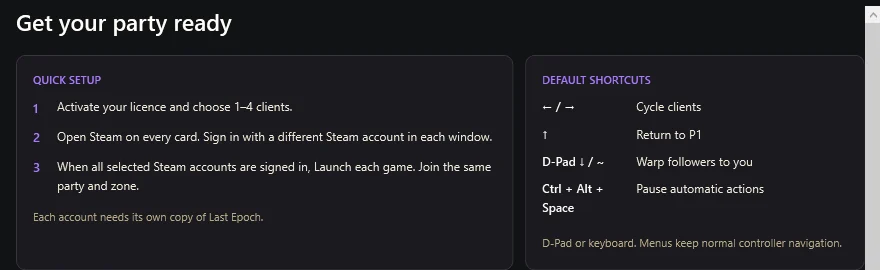
Cycle clients with the D-pad or arrow keys. The character you pick swaps into your main window while the rest keep following. Press Down or ~ and your followers warp straight to you.
Cycle through your clients
Return straight to P1
Warp followers to you
Controller menus keep Last Epoch’s own navigation
Auto Campaign plays Last Epoch’s story with your whole party: it follows the quest log, talks to the right people, opens doors, takes waypoints and fights the bosses. Side quests that give passive points, idol slots and attributes are done on the way, for every character.
Browse Maxroll guides for each character’s class and masteries without leaving the app, or paste a Maxroll or lastepochtools planner link. As characters level, MultiPilot follows a guide’s levelling phases, spends passive and skill points in the build’s order, puts its skills on the bar and equips the upgrades that suit it.
Run up to four Last Epoch clients on one PC and play your main with keyboard and mouse or a controller. Followers keep up through every exit, fight what P1 fights and step out of the attacks that matter. If anyone falls, auto respawn brings them back.
In the Monolith the party heads straight for each echo’s objective, explores as much as you choose and takes the encounters you enable — Nemesis, Omens, Loot Lizards, shrines and more. Echo chains keep going, and corruption stays within your limits.
Your Last Epoch loot filter still decides what shows. MultiPilot picks up what your build wants, drops the junk you’ve marked and sorts your stash tabs by family — uniques by LP, sets, exalted, idols and more — with STASH ALL, SORT STASH and DROP JUNK right in the game’s inventory.
The toolkit
Everything that ships in MultiPilot 1.0.51, grouped by what it helps you do. What’s new in this version and experimental items are labelled.
Press Start and the party plays the story together: quests, talks, doors, waypoints and bosses.
Passive point, idol slot and attribute quests are done on the way.
For rushed characters: finds the missing passive points, idol slots and attributes and does only those quests.
If a follower missed a reward P1 already has, the party goes back for it.
Faction choices, or anything it can’t solve, stop and ask you.
The in-game status line says what is needed and what to do, and Resume tells you if it is still needed.
If arriving in a zone doesn’t count, or the party can’t walk out of a quest area, it goes back and comes in again, like a player would.
Nemesis eggs, Omen Windows, Blood Crystals and shrines are planned when the party arrives in a zone and picked up along the way.
The campaign works with the game set to Korean or any other language.
Ctrl + Alt + F9 starts a run. Ctrl + Alt + F10 pauses and resumes from the live quest state.
Guides for each character’s class and masteries, Season 5 and Season 4, right in the app.
Paste a Maxroll or lastepochtools planner link for any character.
Points are spent in the build’s order, skill specialisations and mastery included.
The build’s skills go onto the ability bar as they unlock.
New skills take over at the levelling guide’s levels, and the skill bar follows each phase.
Skill points the build doesn’t use yet are spent from the guide’s later trees. Turn on “Spend points beyond the build”.
Pick each character’s mastery under Build › Mastery and the campaign takes it at the right point in the story, even without a build.
Generator, spender, melee or ranged, buff, movement and summon are set when you import a build or learn a skill. Your own changes are kept.
Set recommended rotations based on build in one click, with an optional update every level tuned from your recent fights.
Upgrades go on between packs, favouring uniques, corrupted items, higher tiers and weapon damage, with downgrade protection. An item you took off yourself is left alone.
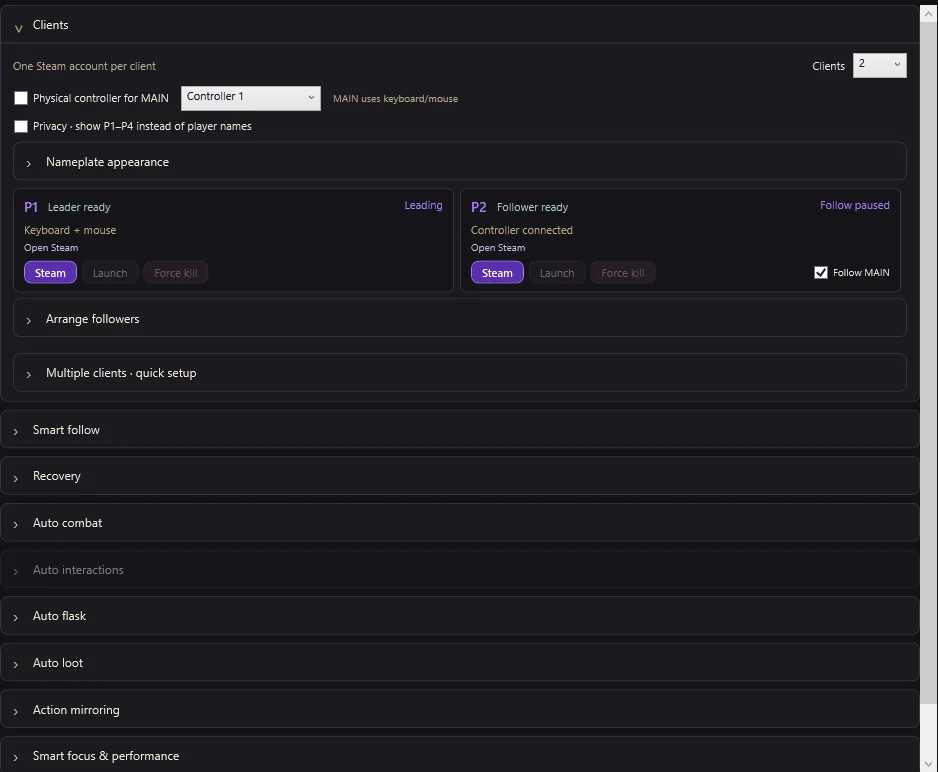
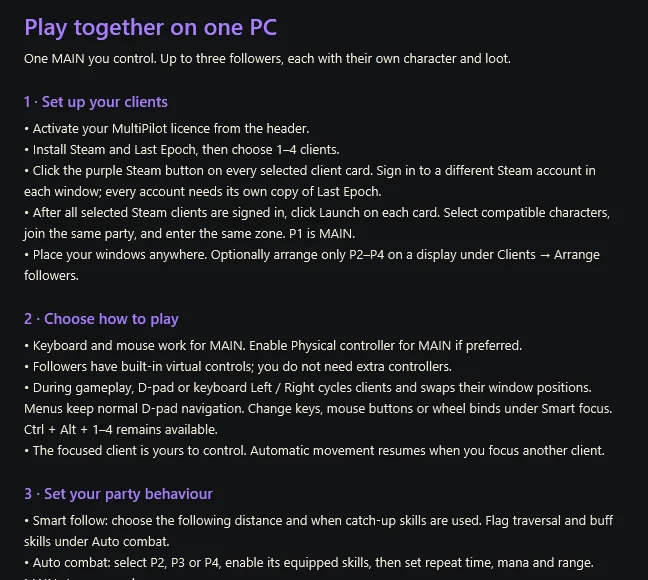
Run a separate Steam account and Last Epoch character in each client.
Control the focused character. Followers use their own private virtual controls.
Switch characters and only the two clients’ windows trade places.
D-pad Up or the Up arrow jumps straight back to your main.
Bring eligible followers to the character you control.
Controller menu navigation stays native while menus are open.
Use keyboard keys, mouse buttons or wheel directions.
Share selected actions while movement and inventory stay local.
Followers stay near MAIN at the distance you choose.
The party stays together through exits and transitions: followers take zone exits, portals and waypoints at the same time as P1.
Flagged traversal skills, buffs and dodges help stragglers catch up.
Followers take stairs and other level changes to reach MAIN.
Followers who fall behind warp back to MAIN on their own. At 5 m or less they keep up without movement speed.
Followers left in another zone, like a new Monolith echo, warp back within 2 seconds.
Flick the right stick and P1 runs that way, fighting and looting until you take over.
Coloured lines show who is following, fighting or looting.
Skills, timing, mana, and Melee or Ranged range for every character, P1 included on autopilot.
Followers take what P1 fights, summoners first, and keep following while P1 travels.
Skills fire only when they reach the target, measured to a boss’s edge, so even huge bosses are fought from the range your skills reach. Characters step in when nothing reaches. Ranges up to 20 m.
Big, stacked or deadly attacks it recognises are dodged, Season 5 attacks included, and dodging stays near the fight.
Buff shrines are taken as soon as a fight starts, and loot is picked up right after it lands.
A real hunt: P1 pushes ahead to the big packs while P2–P4 clean up the small ones, then the arena and the rewards. RUN IT or SKIP right in the game.
Keep walking while P1 fires its skills at enemies in range — any skill plays like Warpath.
Go for bosses, rares or magic enemies first.
Seek a rear position and step back from danger it recognises.
Drink at the threshold you choose and pick up nearby potions when supplies run low.
Recover fallen followers, and P1, which then rejoins the party.
Control moves to a living character when MAIN dies.
Each echo goes straight to its objective: bosses, forges, beacons, spires, arenas and more.
Explore 50–100% of an echo, with a time cap and a detour budget.
Prioritise, fight on the way or ignore Nemesis, Omens, Loot Lizards, shrines, caches and more.
The party gathers and takes the next echo in the chain; stragglers warp to P1.
Each character in the party gets its own Nemesis, one at a time.
Set a maximum and a back-off after deaths or failed echoes.
Bags go into Inventory Dump tabs, then get sorted into families: uniques by LP, sets, exalted, idols and more.
Every character walks to the stash and stashes at the same time, and the campaign waits until everyone is done.
The stash closes again after every visit, and a highlighted item no longer stops stashing, auto-equip or junk.
See every move, new tab and blocked item before anything moves.
A new stash tab is only bought when it costs 10% of your gold or less.
Loot rules that favour your build’s uniques, exalted items, shards, runes, glyphs and keys.
Drop magic, rare or ruined items you’ve marked as junk.
Auto-Stash works on the classic and the new Season 5 stash screen: it buys tabs, creates folders and gives new categories their first tab.
Ice and Blood forging-potential items and the new reward bases are always picked up and never junked. New key caches are opened.
Off by default. At the Bazaar, it auto-lists items at your price — the game’s suggested price, a share of it or an undercut — paced like a player. Never buys, cancels or lowers prices.
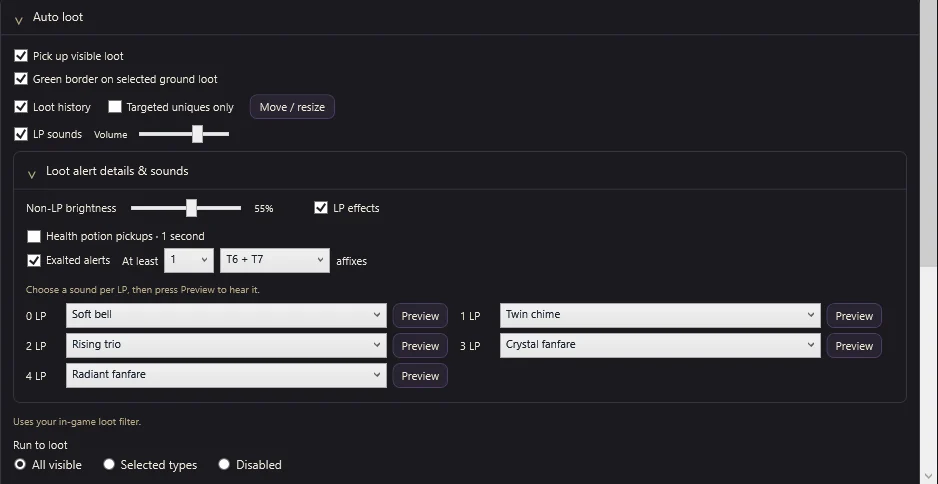
Prioritise chosen uniques with a minimum Legendary Potential.
Stronger LP effects and a previewable sound for each LP tier.
Collected items, LP, exalted affix counts and optional potion counts. Unique, set and legendary pickups stay in the loot history for 5 seconds.
An outline marks the label your character is going for.
STASH ALL, SORT STASH and DROP JUNK sit beside the game’s own TRANSFER and SORT.
See what the party is doing without leaving the game. When it needs you, the status line comes first and says what to do. Long lines wrap.
Move the loot overlay wherever you like; it follows the mouse smoothly.
After a patch, see which feature switched itself off while everything else keeps running.
Split P2–P4 across a display with adjustable spacing.
The client you control gets CPU priority and the full frame rate, so mouse and keyboard stay responsive. The others run lighter.
Show P1–P4 or your own aliases instead of account names.
Adjust overhead text size, font and player colours.
Each client remembers its own Steam account and signs in to it by itself, never to another client’s.
Checks every account is signed in before games launch.
A client won’t launch while it is signed in to the same Steam account as another client, and the app tells you which one.
Force-close one client, or close clients first and then Steam.
Setup steps, keybinds, support and the latest changes at startup.
Clear client, account and control instructions inside the app.
Export a troubleshooting ZIP in one click, campaign logs included, with more personal details hidden.
Activate with your key and open your account from the app.
Download and apply new versions without reinstalling.
Running the installer again keeps every setting you’ve made.
Inside the app
Real screens from MultiPilot. Clear sections, sensible defaults and a welcome screen with everything you need on day one.
Before you start
A 64-bit PC. Start with two clients and add more as your PC allows.
Every client signs in to its own Steam account.
Each account owns Last Epoch. One installation is enough.
Characters that can join one party in the same zone.
Simple pricing
Both plans include every feature and up to four clients. They renew automatically until you cancel in Account.
Checking current prices…
Manage billing, cancel or resume renewal from your account. The 3-month plan renews every 3 months, independently of the game’s season dates. No public free trial.
Press Start and the party plays Last Epoch’s story together: quests, talks, doors, waypoints and bosses, plus the side quests that give passive points, idol slots and attributes. When a choice is yours, like joining a faction, or something needs you, it stops and tells you what to do.
Pick a Maxroll guide for each character’s class in the app, or paste a Maxroll or lastepochtools planner link. Turn on auto-allocate and MultiPilot spends passive and skill points in the build’s order, follows a guide’s levelling phases, fills the skill bar and equips upgrades.
Yes. Play any character whenever you like. Ctrl + Alt + F9 starts a run, Ctrl + Alt + F10 pauses or resumes it, and Ctrl + Alt + Space pauses all automatic actions.
A Windows 10 or 11 (64-bit) PC, four Steam accounts and a copy of Last Epoch on each account. MultiPilot opens a separate Steam and game client for every account on the same desktop.
No. Your main character uses keyboard and mouse or one physical controller. Followers use their own private virtual controls, and every window stays on your normal desktop.
Yes. Choose one, two, three or four clients in the app, and add more whenever you like.
Followers need to join your party, and in Last Epoch only online characters can party. Offline and Solo Character Found characters can’t join one.
Yes, if you turn Auto-Stash on. It starts in Dry run so you can see every move first. It only works at the real stash, never deletes, sells or salvages anything, and the Gold Guard limits what a new tab may cost.
No. Keep using Last Epoch’s own loot filter. MultiPilot collects loot the filter shows and lets you choose which types followers run toward.
Choose $29.99 every 30 days or $69.99 every 3 months (USD). Both renew automatically until cancelled and include every feature and up to four clients.
Yes. Open Account on this website to manage billing, cancel renewal or resume it. Your access continues until the end of the paid period.
There is no public free trial. Both plans include every feature, so you can start with the 30-day plan and cancel renewal if it isn’t for you.
No. Avoid danger and smart dodging react to the attacks they recognise, and they don’t recognise every one. Stay behind target is experimental. Take control yourself in dangerous encounters.

Install MultiPilot, activate your licence key and choose your clients.