
Feature · Loot
Targeted uniques,
LP alerts and auto loot.
Your loot filter decides what matters. MultiPilot makes sure your party collects it, that you hear about the drops worth celebrating — and that it ends up in the right stash tab.
It starts with your loot filter
Last Epoch’s built-in loot filter hides items you don’t want and highlights the ones you do. Rules at the top take priority, and you can open it in game with Shift + F. MultiPilot works with whatever your filter shows — it doesn’t replace it.
Auto loot, within your limits
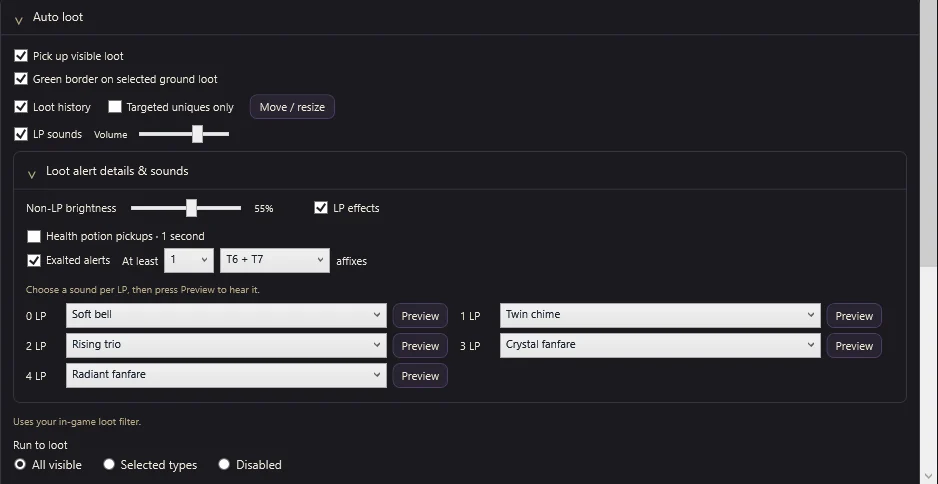
Followers collect or chase eligible visible loot within the limits you set. Choose whether they run to all visible loot, only selected types, or not at all. A ground-loot highlight outlines the label being collected so you always know what they’re going for.
Targeted uniques with a minimum LP
Legendary Potential (LP) on a unique decides how many affixes it can carry into a legendary item when you combine it with an exalted item at the Temporal Sanctum. Uniques can roll from 1 to 4 LP.
Pick the uniques you’re hunting from the catalogue and set the minimum LP for each. Targeted drops get priority, and you can show loot history for targeted uniques only.
Hear every important drop
- A sound per LP tier — choose from bells, chimes and fanfares for 0–4 LP and preview each one in the app.
- Stronger LP effects — make LP drops stand out, and dim non-LP items to the brightness you like.
- Detailed notifications — see collected items with LP, exalted affix counts and, optionally, potion pickups.
- Exalted alerts — get notified when an exalted item meets your affix-tier threshold.
Auto-Stash sorts it for you
Turn on Auto-Stash for a character and its bags go into your Inventory Dump tabs at the stash. From there items are sorted into their families — uniques by LP, Weaver’s Will, legendaries, sets, exalted and corrupted items by slot, idols and more. Your existing tabs are adopted by name; tabs it doesn’t recognise are left alone.
- Dry run first — Auto-Stash starts off and in Dry run, with a list of what would move, what would need a new tab and what stays put.
- Gold Guard — a new tab is only bought when a family is full and the tab costs 10% of your gold or less.
- In the game — STASH ALL and SORT STASH sit next to the inventory’s own TRANSFER and SORT buttons.
- Nothing lost — the stash never deletes, sells or salvages. Items it isn’t sure about stay in the dump.
Junk rules and what to pick up
Choose what the party picks up — build uniques, exalted items, shards, runes, glyphs and keys first — and mark magic, rare or ruined items as junk. DROP JUNK in the inventory, or the automatic junk drop, clears them from your bags once combat is over.
The good stuff
gets noticed.
Targeted uniques glow, pickups announce themselves, LP drops get their own sound — and Auto-Stash files the lot.
FAQ
Questions,
answered.
Does it replace my loot filter?
No. Keep using Last Epoch’s own loot filter. MultiPilot collects loot the filter shows and lets you choose which types followers run toward.
What is Legendary Potential?
LP on a unique item sets how many affixes it can carry into a legendary when combined with an exalted item at the Temporal Sanctum. Uniques roll between 1 and 4 LP.
Can I use different sounds for each LP tier?
Yes. Assign a sound to 0, 1, 2, 3 and 4 LP and preview each in the app.
Will followers run across the map for loot?
Only within the limits you choose. Pick all visible loot, selected types, or turn running to loot off.
Does it manage my stash?
Yes, if you turn Auto-Stash on. It starts in Dry run so you can see every move first. It only works at the real stash, never deletes, sells or salvages anything, and the Gold Guard limits what a new tab may cost.
Can I drop junk automatically?
Yes. Mark magic, rare or ruined items as junk and turn on junk actions. DROP JUNK in the inventory drops them straight away; with junk actions off, nothing is dropped.